

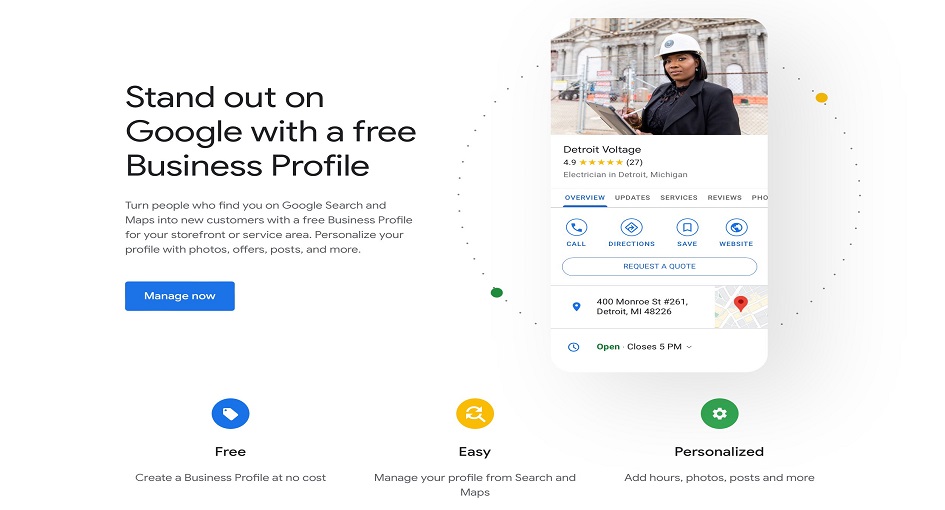
In today’s competitive digital landscape, having a strong online presence is essential for any business looking to attract new customers and stay ahead of the competition. One of the most effective ways to enhance your visibility is by optimizing your Google Business Profile Page login. Formerly known as Google My Business, this free tool enables businesses to manage their online presence across Google, from search results to My business on Google map. By ensuring your profile is fully optimized, you not only improve your chances of appearing in local search results but also provide potential customers with key information about your business, including your address, company hours, phone number, and more.
When used correctly, a well-optimized Google Business Page can be a game-changer. It allows businesses to showcase their offerings, interact with customers, and even provide real-time updates and promotions. This is especially crucial for local businesses that rely on nearby customers finding them via Google search or Google Maps. With billions of people using Google every day to find products and services, a complete and compelling profile can help set you apart from the competition, boost your search ranks, and boost online sales or foot traffic.
From the Business Profile Page login to Google My Business sign-up and managing customer reviews, optimizing your business profile is not just about filling out forms it’s about creating a dynamic and engaging online presence that speaks directly to potential customers.
Claim and Verify Your Google Business Profile Page
If you haven’t done so already, visit the Google My Business sign up page to start the process. After logging into your Google account, search for your business name to see if it already exists in Google’s database. If it does, claim the profile; if it doesn’t, create a new business listing. You will need to complete the verification process, which may involve receiving a postcard by mail with a verification code, or phone or email verification, depending on the type of business you run.
Complete All Information on Your Google Business Profile Page
A complete profile not only improves the chances of showing up in Google searches but also helps potential customers trust your business. Business Profile Pages that are fully filled out are more likely to rank higher in search results.
- Business Name: Use your official business name, as it appears on your website and other listings. Avoid keyword stuffing in this field.
- Business Address: Ensure that your address is accurate and consistent across all online platforms.
- Phone Number and Website: Include a phone number with a local area code if possible. Adding a link to your website is also vital for directing customers to more information.
- Business Hours: Provide accurate business hours, including special hours for holidays or unusual circumstances.
Add Photos to Your Business Profile Page
Visual content is critical when attracting potential customers. Make sure to regularly upload high-quality images of your business, products, or services. These could include:
- Exterior Photos: A photo of your storefront or office helps potential customers recognize your business location.
- Interior Photos: Show off your space, office, or showroom to give customers a sense of what to expect when they visit.
- Product Photos: If you’re selling products, showcase high-resolution images that best represent what you offer.
- Team Photos: A friendly image of your staff or team members adds a personal touch and builds trust.
Google also offers the ability to upload videos to your profile, so take advantage of this feature as well.
Use the Google Business Profile Page App
To manage your profile on-the-go, download the Google Business Page app for Android or iOS. The app allows you to update your business information, post updates, and respond to reviews from anywhere. The ability to manage your profile from your phone ensures that you can keep your business information up-to-date and respond to customer inquiries quickly.
Regularly Post Updates and Offers
One way to engage with your audience and keep your profile fresh is to post regular updates. Business Profile Pages allow you to post news, offers, events, and other relevant updates. These posts can include promotions, new products, or seasonal hours. Keep the following in mind when creating posts:
- Clear and Concise: Make sure your posts are easy to read and relevant to your audience.
- Include Calls to Action: Encourage people to take action, such as “Call Now” or “Learn More,” by adding a strong call to action.
- Frequency: Regular posts keep your profile active, which can improve visibility and engagement.
Enable Messaging on Your Google Business Profile Page
Google allows business owners to enable direct messaging with customers via the Business Profile Page app or from the Business Profile Manager. This feature makes it easier for potential customers to reach out with questions, inquiries, or service requests. It also helps create a more personal connection with your audience.
Keep Your Business Profile Page Updated
Your Google Business Profile Page search is not a one-time setup; it requires continuous maintenance. Check for any changes in your business hours, address, or phone number, especially during holidays or special events.
Leverage Google My Business Features for SEO
To further improve your SEO, leverage all available Google My Business tools. Adding relevant keywords to your business description, choosing the correct business category, and using local identifiers like your city or neighborhood can help you rank higher in Google searches.
In the end, optimizing your Business Profile Page is an ongoing process that can significantly impact your visibility and reputation in local search results. By taking advantage of features like adding photos, collecting reviews, posting updates, and ensuring your business details are accurate, you can boost your chances of attracting more customers. Whether you use the Google Business Profile Page app, Business Profile Manager, or access the Google My Business login, consistent management of your profile is key to staying competitive. Following these steps will help you create a dynamic, effective profile that stands out in Google’s search and map results.